Start with the job identity
The material, thickness, width and tool fields describe the job being prepared. Confirm each against the approved drawing and setup. The screenshot's material names and dimensions are illustrative.
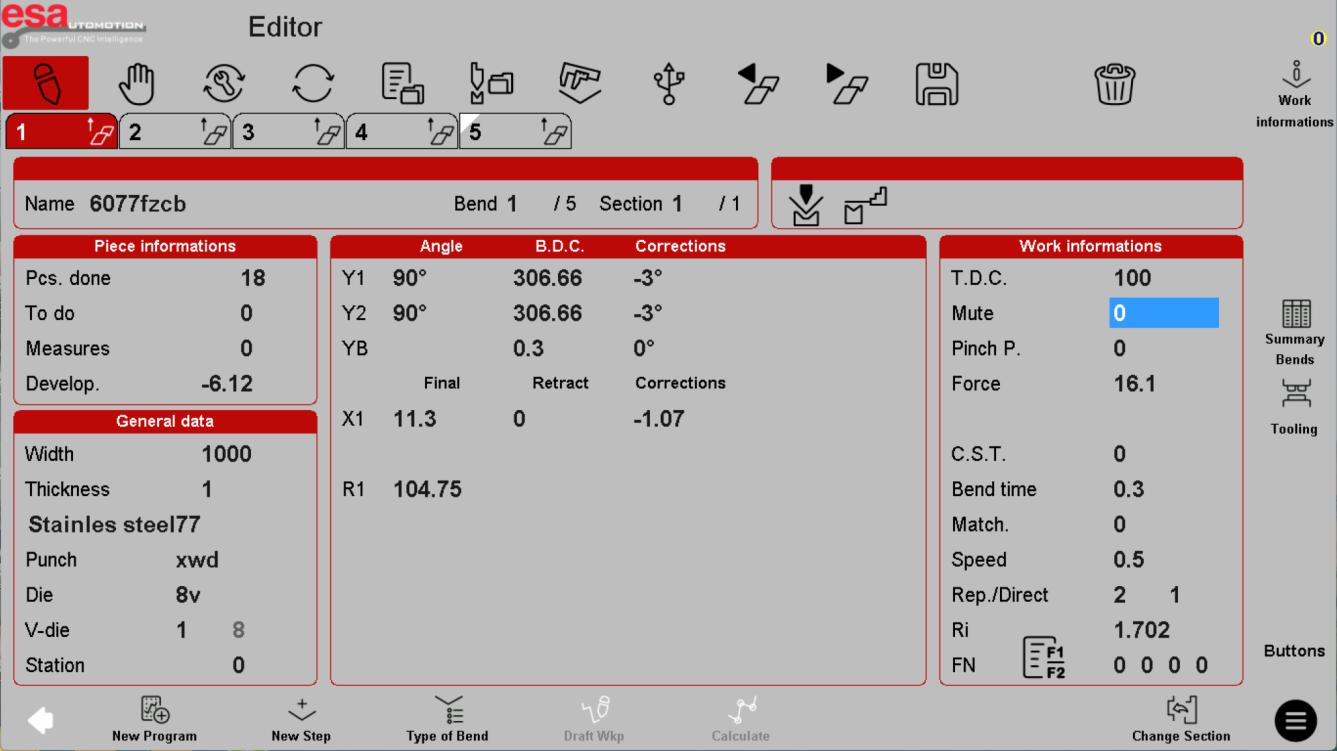
Focus on General data: material, thickness, width and tool selection.
Separate targets from corrections
The middle area groups ram and gauging values with correction fields. X relates to gauge depth and R to gauge height where fitted; Y1/Y2 describe ram channels. Displayed labels do not establish which axes your particular machine has.
Same editor reference: compare the axis targets with the separate correction columns.
Know which settings need authorization
Force, speed, approach transition, pinch-point behaviour, timing and reference settings can affect safety and the process. Do not copy these from a screenshot or alter protected settings to clear an alarm. Use the machine-specific manual and qualified support for limits and adjustment procedures.
Same editor reference: Work informations contains cycle-related settings that require machine-specific authorization.
Before using this on your machine
- Confirm S840 versus S840 W and the installed software revision.
- Check that the documented functions match your licenses and fitted axes.
- Protect released program and tool-library versions before changes.
- Use qualified support for motion, reference, force and safety-related settings.
S840 W specifications and option notes →
Discuss your control requirements →BENDRYX educational commentary with permission-based S840 reference screenshots. This lesson is not a machine certification, a commissioning instruction or a replacement for the supplied operating manual.